Tuesday, March 6, 2012

Sunday, May 8, 2011
Final Project Final Post
Im finished!! Here it is! I was surprised at how long the rendering process took, but I guess I should have known with all the particles I had in it. The purple smoke is a particle, the colorful orb is a particle, and the moving "ocean" surface is also a particle. I actually had a few more effects in my video, but it was going to take like two full days to render, so I decided to take a few out. I am happy with how the visualization turned out using the particle system in the trapcode particular and soundkey plugin in. Also, the visualization in the credits were done with soundkey and particles also. Well, here it is... enjoy!
Untitled from Brent Borochoff on Vimeo.
Final Project Post 3
In week 3 I was nearly done. I had my new visualization finished and most of the Jimi pictures into the video. All I had left was to finish putting in the Jimi pics and polish some of my particles and add the credits page. And then render... which ended up taking about 8-9 hours!!!!
Final Project Post 2
I made a visualization to crosstown traffic, and although it was cool, I decided it wasnt good enough to use as my main project so I think I am going to use it in the credits of my video. That one is posted here... I am still working on another visualization that I feel is better...
[uploaded wrong video.. will be uploading correct one soon]
[uploaded wrong video.. will be uploading correct one soon]
Final Project Post 1
Pitch: I will be making a visualization of one of Jimi Hendrix's song, either Purple Haze or Crosstown traffic. The video will have one or more particle groups that move to the beat of the song. I will also feature some pictures of Hendrix in the background that follow along with the song.
Reference images/audio:
Jimi Hendrix - Purple Haze
Jimi Hendrix - Crosstown traffic


 Uploaded with ImageShack.us

Schedule:
•week1 -- preproduction, Collect pictures and songs to be used in my video, edit the photos using mattes and other technique to be used.
•week2 -- Create the particle systems to be used in my video
•week3 -- Add in the Jimi pics and correlate them in sync with the music
•week4 -- refine effects, add credits and title page, render
Reference images/audio:
Jimi Hendrix - Purple Haze
Jimi Hendrix - Crosstown traffic


 Uploaded with ImageShack.us

Schedule:
•week1 -- preproduction, Collect pictures and songs to be used in my video, edit the photos using mattes and other technique to be used.
•week2 -- Create the particle systems to be used in my video
•week3 -- Add in the Jimi pics and correlate them in sync with the music
•week4 -- refine effects, add credits and title page, render
Friday, April 29, 2011
1st experience animating a rigged model
First time I animated a rigged model... I used the graph editor to make fine tune adjustments for the moving parts. Portraying a realistic looking leap with accurate gravity is a little difficult but I learned a lot by manipulating the keys in the graph editor.
1st experience animating a rigged model from Brent Borochoff on Vimeo.
Friday, April 15, 2011
1st Cut RotoScope
[Edit]
I also did an animation of the robot and adjusted some values (such as speed) using the graph editor.
We took video footage of the class, and I rotoscoped the robot model I did from an earlier post. This is the first cut of the video I still have a little work to do.
Rotoscope from Brent Borochoff on Vimeo.
I also did an animation of the robot and adjusted some values (such as speed) using the graph editor.
We took video footage of the class, and I rotoscoped the robot model I did from an earlier post. This is the first cut of the video I still have a little work to do.
Rotoscope from Brent Borochoff on Vimeo.
Friday, April 8, 2011
Maya Render of Old West Sheriff Office
A model I did in Maya of an "old west" Sheriff's Office... I applied textures and bumpmaps to achieve a more realistic scene.


Thursday, April 7, 2011
Green Screen Practice
I took a video clip of a "wizard" in front of a green screen, added the background castle and then a bunch of effects in After Effects to produce the "power" particle system that follows the motion of the wizard's hands. Oh ya, and then since rendering took 30 minutes, I threw the video in Final Cut Pro and put, Trevor Rabin's, "Sorcerer's Apprentice" clip in the background.
Evil Wizard from Brent Borochoff on Vimeo.
Thursday, March 31, 2011
Friday, March 11, 2011
Thursday, March 3, 2011
Animated Text
I used After Effects cs5 to animate text. I used some text effect presets (and tweaked the settings) and then did some of my own text animations.
Ballen B Productions Text Animation from Brent Borochoff on Vimeo.
Thursday, February 24, 2011
Motion Tracking in After Effects CS5......
My first attempt was pretty easy because the video had minimal movement. I simply stabalized the original video and then motion tracked and added my intro.
My second attempt was a little more difficult and it showed in the quality of the motion tracking.
MTLQ from Brent Borochoff on Vimeo.
My second attempt was a little more difficult and it showed in the quality of the motion tracking.
Lighting Effects for Maya


Thursday, February 17, 2011
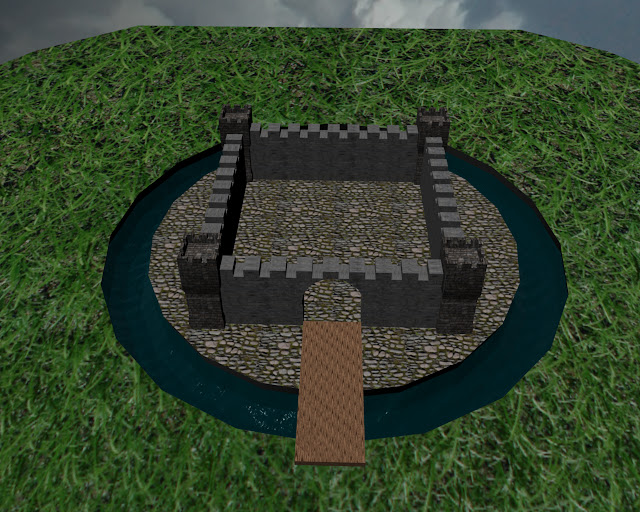
Modeled Castle with Textures
I used primitive objects (squares, spheres, cylinders) to model this very simple castle. I also utilized boolean operaters to get the "difference" between polygons to carve the different holes and cut-outs around the castle. I then used several different textures (one for the castle's towers, one for the stone wall, one for the floor in the castle, a wood texture for the draw-bridg, a water texture for the moat, a grass texture, and then finally a sky textured to the sphere surrounding the castle to create the sky. Turned out pretty well for my first attempt at mapping textures onto my models! :)




After Effects Advanced Animation
Untitled from Brent Borochoff on Vimeo.
For this video, I utilized the graph editor to manipulate the time of the fly-out of the first group of spaceships. They are moving at a constant speed until near the end when they fly out faster. I then created a null object and "lasso whipped" three separate "debris items" (also known as parenting.) Because of this, I was able to edit each item (rotate, etc) while moving all of the debris items (position and rotation) with the null object.
Thursday, February 10, 2011
Primative Maya
Here's My Robot...
I used a lot polygonial modeling techniques to build and edit. I also used the loft command to connect two circles. Well, here they are...


I used a lot polygonial modeling techniques to build and edit. I also used the loft command to connect two circles. Well, here they are...


Wednesday, February 9, 2011
Thursday, February 3, 2011


Subscribe to:
Posts (Atom)